Adopting existing eBay listings
If a listing already exists on eBay but has no letsList , it appears as . connects that listing to your inventory once. After that, is the repeatable path for preparing changes.
What means
Legacy is an inventory relationship, not an eBay status. The listing can be live or ended on eBay; the badge only means letsList has not attached it to one of your SKUs. This often happens when you listed directly on eBay or used another listing tool.
A Legacy listing is still controlled by eBay and follows its normal sale or end timeline. You can view it in letsList, but a live Legacy listing must be adopted before letsList can prepare a revision or AI enhancement for it.
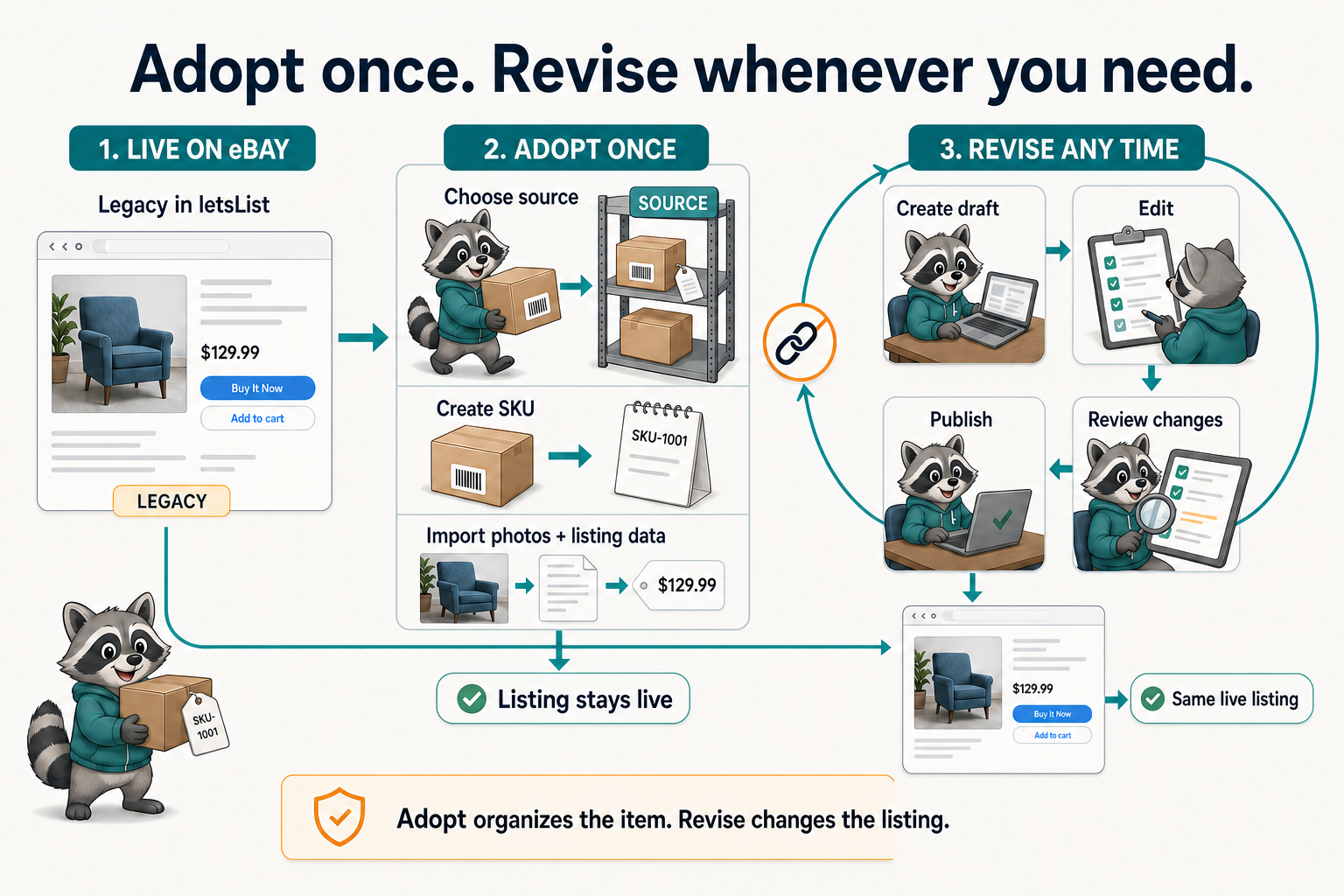
What adoption changes
- Creates a letsList SKU for the physical item
- Imports the listing photos and key eBay data
- Links the eBay item to that SKU for future work
- Places the SKU in the source you currently have selected
Adoption does not end, duplicate, or republish the eBay listing. Buyers keep seeing the same item. It also does not replace the Custom label already stored on eBay; letsList creates its own internal inventory identity and links the records.
Choose the source before you adopt
The source picker controls where newly adopted SKUs land. If you care about deal, consignor, or haul tracking, create and select that before you select listings. The Adopt button includes the destination source code so you can check the decision before starting the import.
Casual inventory
Keep the built-in source selected and adopt everything there. This is enough when you do not need per-deal organization.
Deal-based inventory
Select the estate sale, consignment, auction lot, or other source first. Adopt only the matching listings, then switch sources and repeat.
How sources separate deals and keep each batch's intake work focused.
Adopt once, revise many times
A reliable adoption workflow
- Sync your eBay listings so the Listings view reflects the account you want to organize.
- Create the destination source, or decide to use Default.
- Select that source in the top-bar source picker.
- In Listings, filter or search for the Legacy rows that belong to the source.
- Select the rows and check the source code shown on the Adopt action.
- Adopt. When the import finishes, the Legacy badge disappears and the SKU is available in your inventory.
- For a live listing you want to change, select it and create a revision draft.
Ended listings are still useful inventory history
You can also adopt an ended Legacy listing. It cannot be revised as a live item, but adoption connects the historical row to a SKU and source. That preserves provenance, consignment context, and price history inside the same inventory model as your active items.
You do not have to adopt everything
Adoption is optional. A Legacy listing remains live or ends on eBay either way. Adopt the inventory you want letsList to organize, revise, research, or use in source-based workflows. Leave the rest alone until it matters.
Before you publish a revision
Creating the revision draft is still private. Publishing is the separate step that writes changes back to the live eBay item, after a before-and-after review.
How preview, change review, acknowledgement, and publish fit together.